디자인 토큰 추출·발행 실습
Figma 디자인 시스템 정리 실습에서 정돈한 변수를 토큰 JSON으로 내보내고, CSS 변수로 변환합니다. 개념 설명은 디자인 토큰 추출·발행에 있으므로 이 문서에서는 반복하지 않고 작업 순서와 확인 방법만 둡니다.
| 구분 | 내용 |
|---|---|
| 입력 | Figma 디자인 시스템 정리 실습을 마친 파일 |
| 산출물 | tokens/tokens.json, build/css/variables.css |
| 다음 단계 | CSS 변수 파일이 컴포넌트 라이브러리 실습의 입력이 됩니다. |
실습 환경
변환 도구의 버전에 따라 명령어와 출력이 달라질 수 있으므로 아래 버전으로 맞춥니다. 이 문서의 변환 결과는 이 버전으로 직접 실행해 확인한 값입니다.
| 도구 | 버전 | 비고 |
|---|---|---|
| Node.js | 22.22.2 | Style Dictionary 5.x는 Node.js 22 이상 필요 |
style-dictionary |
5.8.0 | |
@tokens-studio/sd-transforms |
2.0.3 | ESM 전용 |
1. 작업 폴더 준비
1-1. 프로젝트 만들기
-
작업: 환경 체크리스트에서 만든
design-system-practice폴더에서 터미널을 열고 아래 명령을 한 줄씩 실행합니다.명령어
출력 결과
명령어
출력 결과: 없음(출력이 없으면 정상입니다).
명령어
출력 결과
- 경로의 사용자 이름,
name값(폴더 이름), 패키지 수, 소요 시간, 취약점 개수는 환경에 따라 다를 수 있습니다. npm audit fix --force는 실행하지 않습니다. 버전이 바뀌어 이후 단계의 결과가 달라질 수 있습니다.
- 경로의 사용자 이름,
-
기대 결과: 폴더에
package.json과node_modules가 생깁니다.package.json에"type": "module"이 들어 있습니다. -
확인 방법: 아래 명령으로 두 패키지의 버전이 표와 같으면 정상입니다.
명령어
출력 결과
npm install중npm audit관련 안내가 나와도 실습에는 영향이 없습니다. 폴더 이름에 따라 첫 줄의 프로젝트 이름은 다르게 보입니다.
2. Figma 변수 → 토큰 JSON
2-1. 토큰 내보내기
수동 방식을 먼저 진행합니다. 추출 방식은 개념 문서의 선택 제안을 따라 Tokens Studio 플러그인과 단일 JSON 파일을 씁니다.
-
작업:
- Figma 디자인 시스템 정리 실습을 마친 파일을 엽니다. Variables 화면에
primitive6,radius2,semantic8,spacing4 컬렉션이 있어야 합니다. -
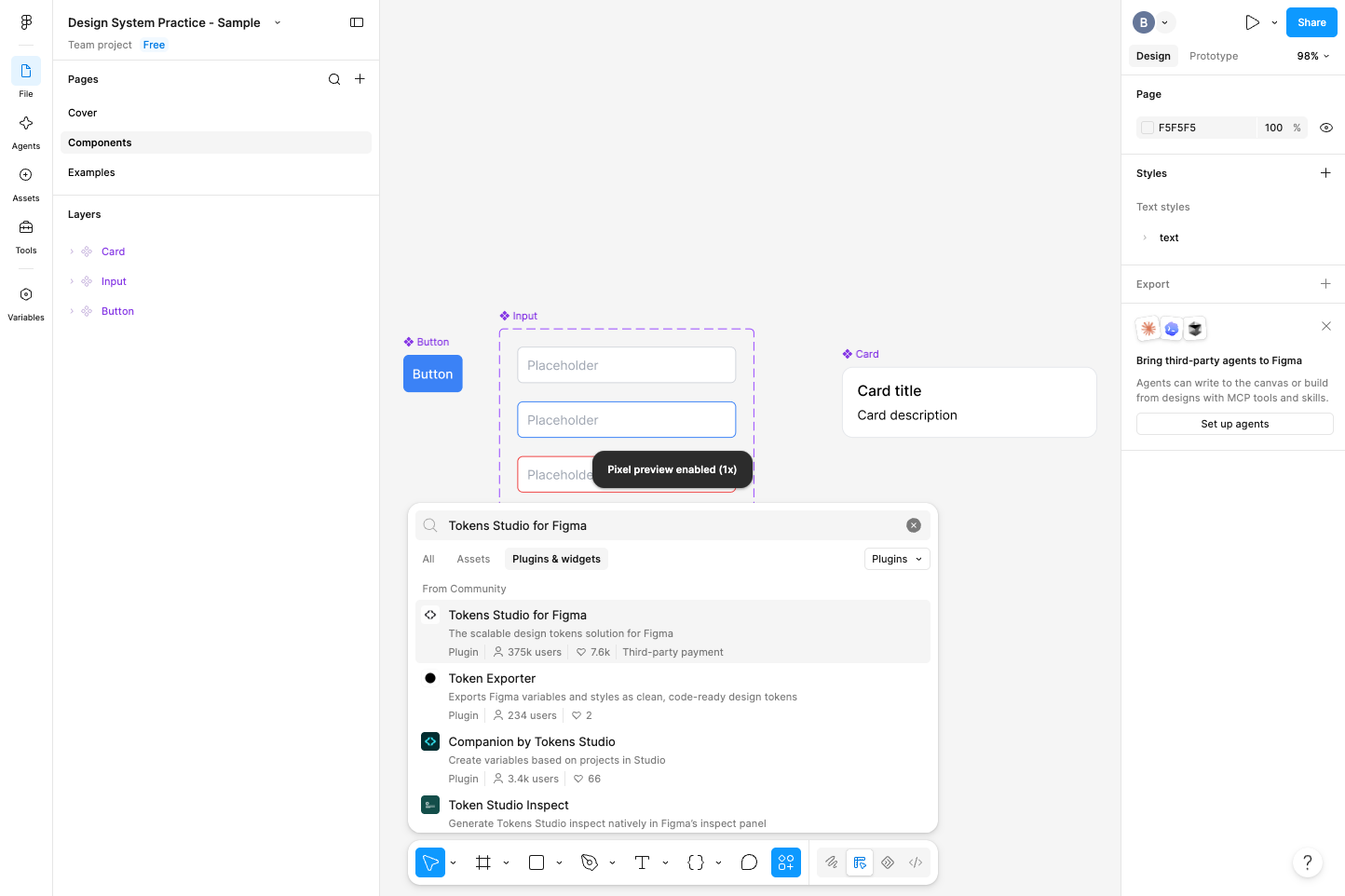
왼쪽 위 Figma 메뉴에서 Plugins → Manage plugins... 를 열고, 하단 검색창에
Tokens Studio for Figma를 입력해 같은 이름의 플러그인을 선택합니다.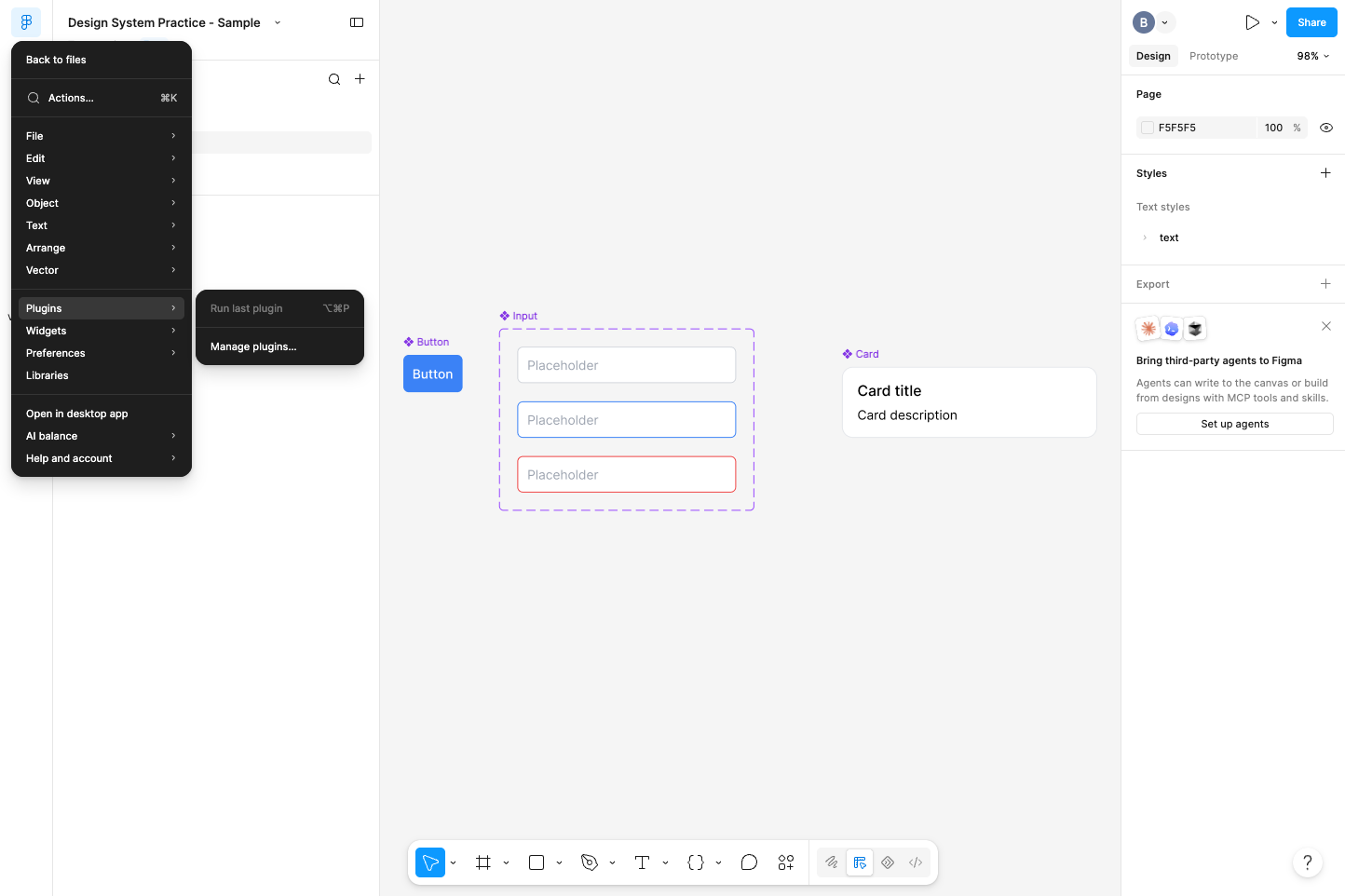
-
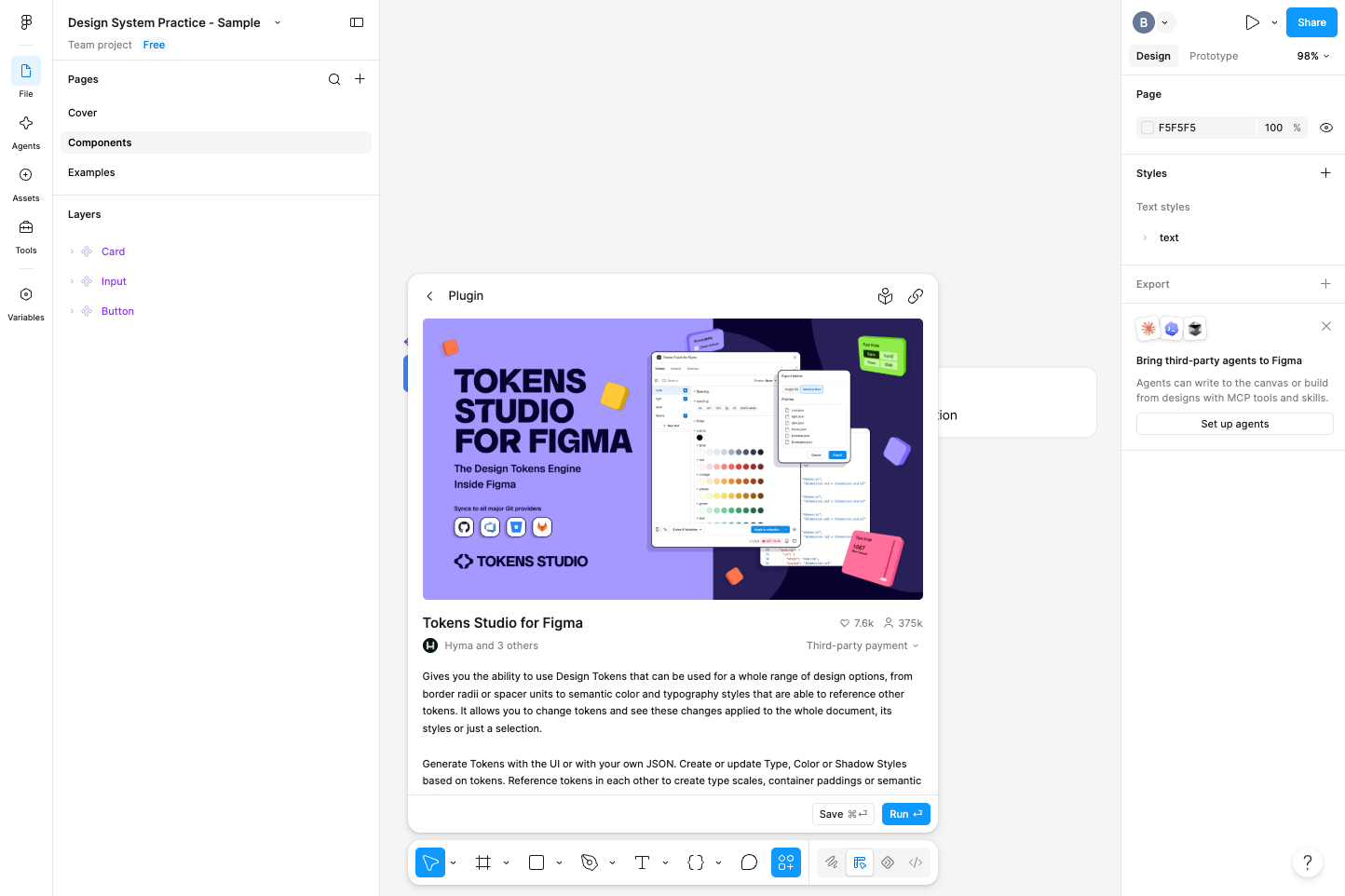
상세 화면 오른쪽 아래의 Run을 누릅니다. 별도의 Install 버튼은 없으며, Run이 내 계정에 추가하면서 실행합니다.
-
시작 화면에서 New empty file을 누릅니다. Load example은 샘플 세트(
core,light,dark,theme)가 들어와 내보낸 JSON에 섞이므로 쓰지 않습니다.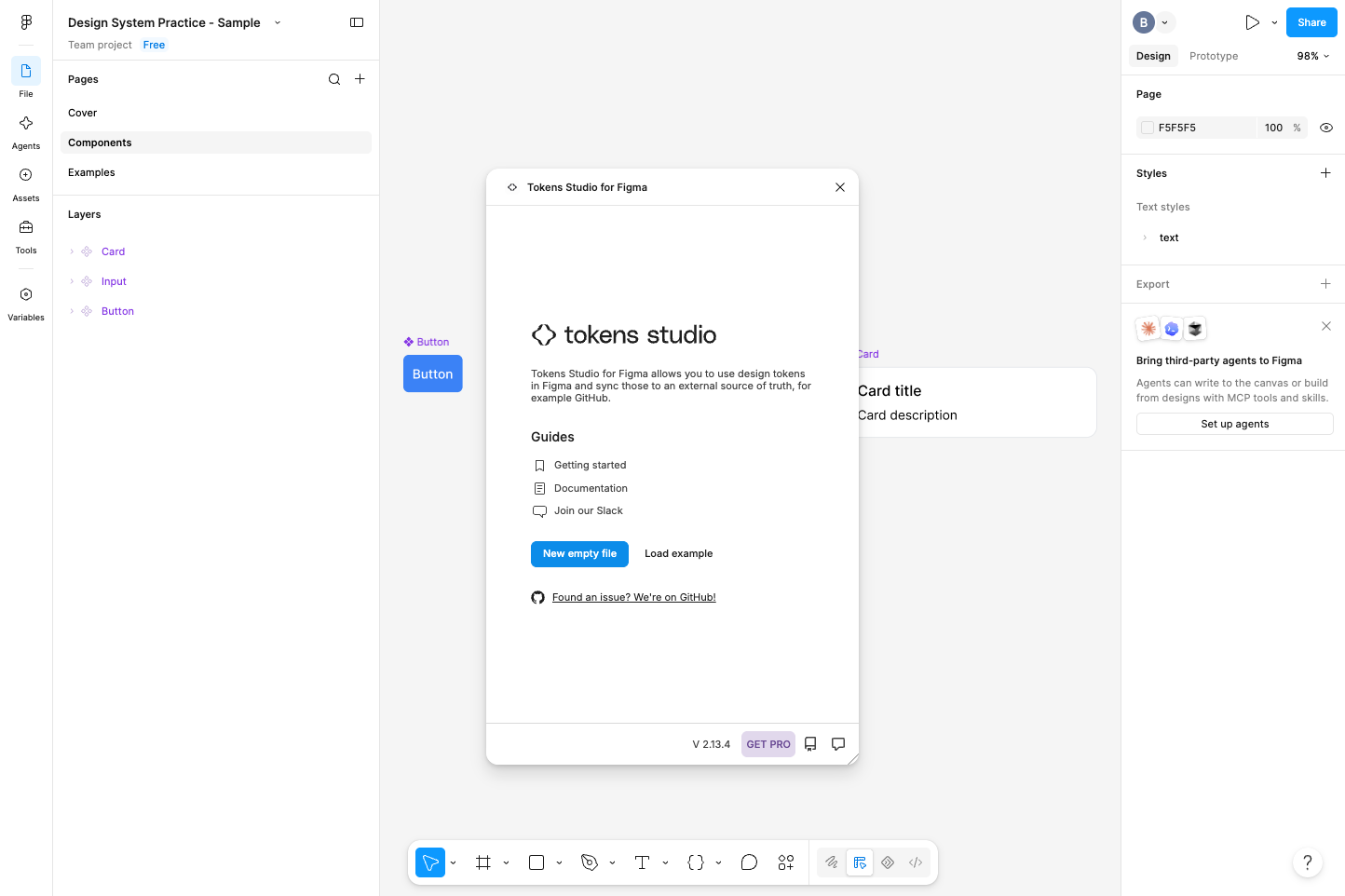
-
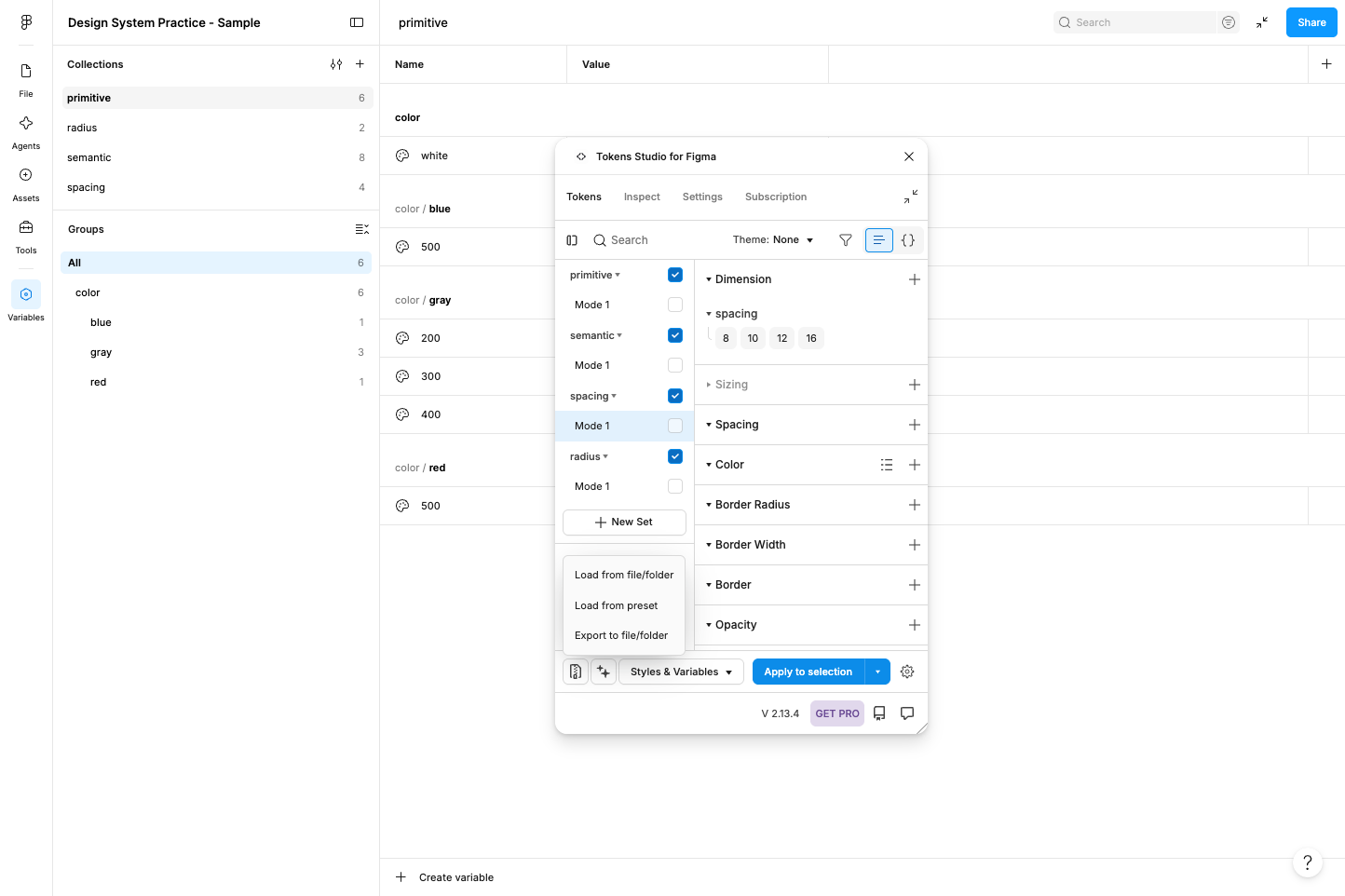
하단의 Styles & Variables를 눌러 Figma 변수를 가져오는 항목(Import variables)을 고릅니다.
-
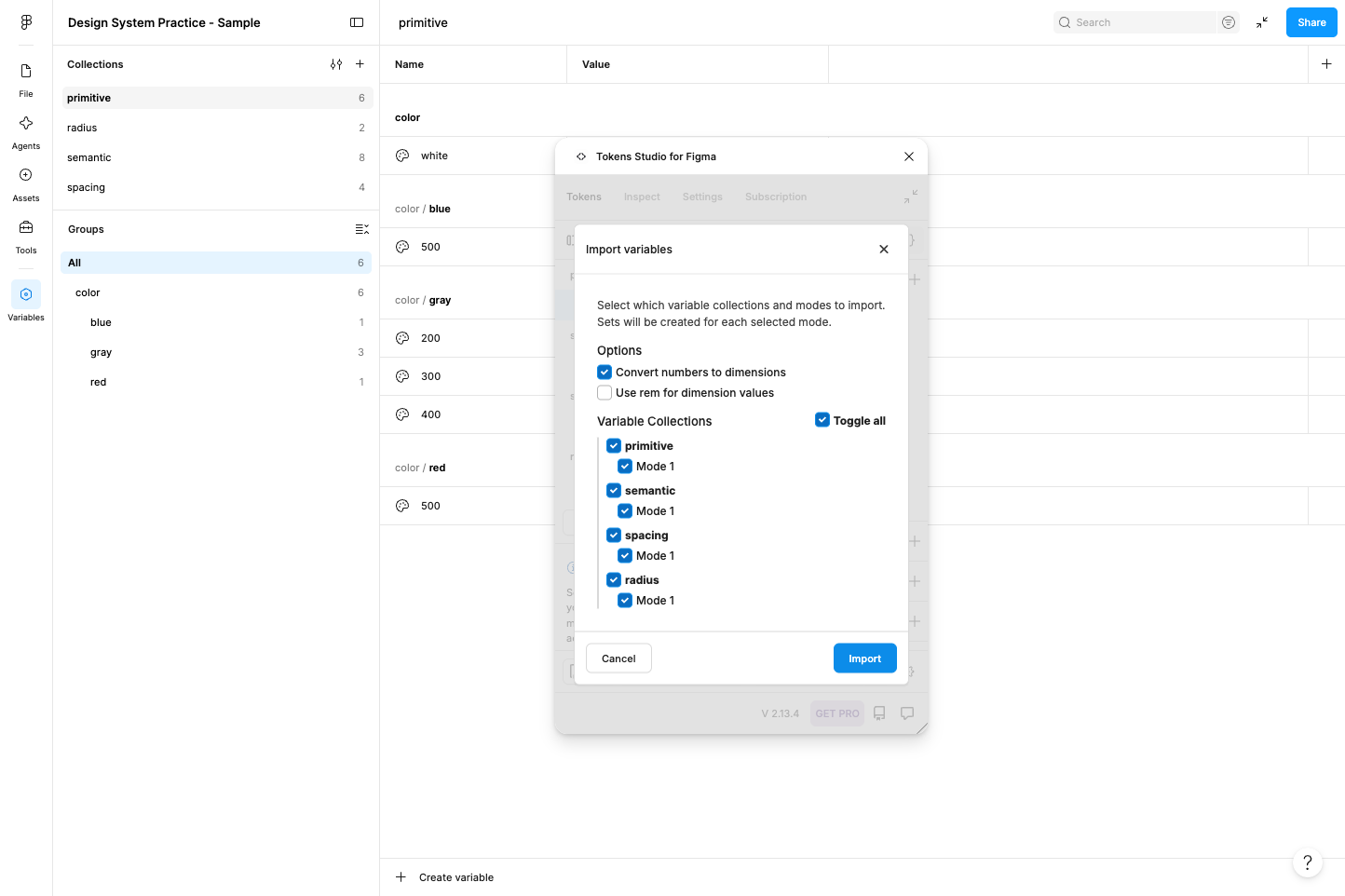
아래처럼 지정하고 Import를 누릅니다.
- Convert numbers to dimensions: 체크합니다. 간격·반경 값이
dimension타입이 됩니다. - Use rem for dimension values: 체크하지 않습니다.
- Variable Collections:
primitive,semantic,spacing,radius와 각Mode 1을 모두 체크합니다.
- Convert numbers to dimensions: 체크합니다. 간격·반경 값이
-
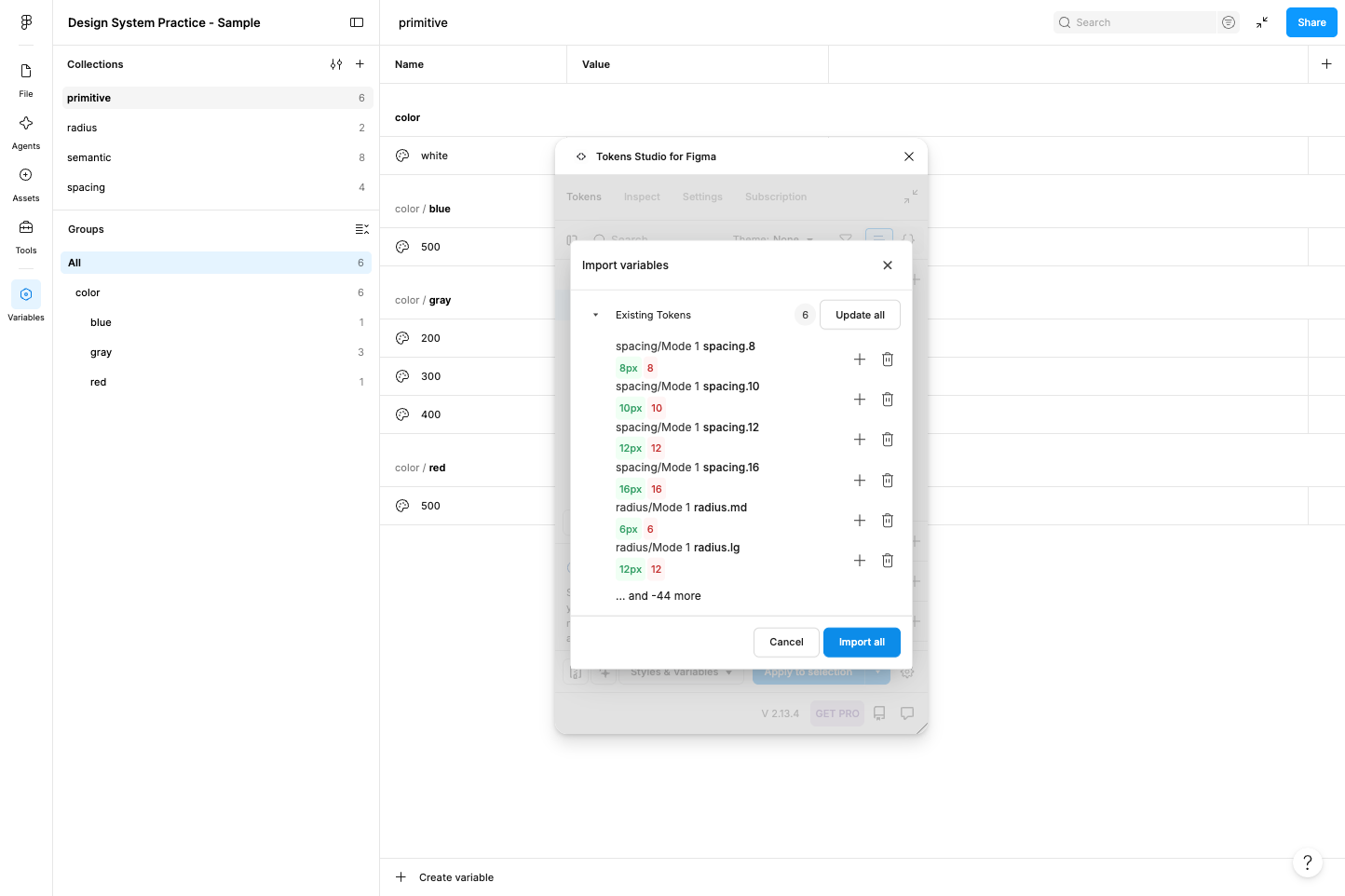
다음 창에서 Import all을 눌러 토큰 20개를 가져옵니다. 이미 가져온 토큰이 있으면 갱신 대상으로 표시됩니다.
-
하단 왼쪽 첫 번째 아이콘(문서 모양)에서 Export to file/folder를 고릅니다.
-
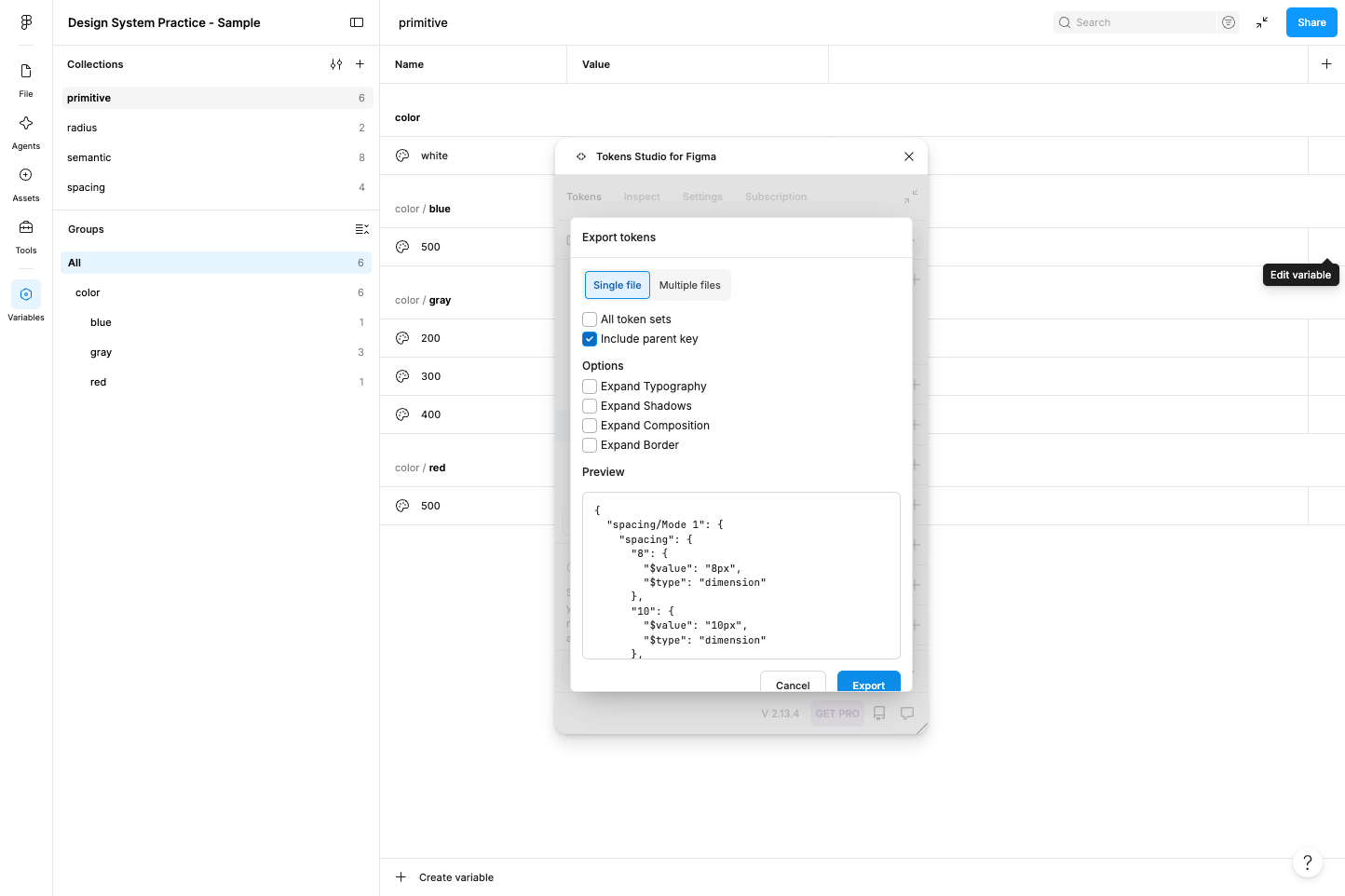
Single file을 선택하고 All token sets를 체크합니다. Include parent key는 체크된 그대로 두고, Expand ... 항목은 모두 끈 채로 Export를 누릅니다.
-
내보낸
tokens.json은 먼저 다운로드 폴더(~/Downloads)에 저장됩니다. 작업 폴더에서 아래 명령으로tokens/tokens.json으로 옮깁니다.명령어
출력 결과: 없음(출력이 없으면 정상입니다). 같은 이름의 파일이 이미 있으면
tokens.json (1)처럼 이름이 달라질 수 있으니 파일 이름을 확인합니다. 2. 기대 결과:tokens/tokens.json이 생기고, 최상위 키로 네 세트(primitive/Mode 1,semantic/Mode 1,spacing/Mode 1,radius/Mode 1)가 보입니다. 3. 확인 방법: 2-2의 정답 JSON과 이름·참조·개수를 비교합니다. 아래 표의 세 가지 차이는 정상입니다.
- Figma 디자인 시스템 정리 실습을 마친 파일을 엽니다. Variables 화면에
| 차이 | 내보낸 파일 | 정답 JSON | 영향 |
|---|---|---|---|
| 세트 이름 | primitive/Mode 1처럼 모드 이름이 붙음 |
primitive |
없음. 3단계의 excludeParentKeys: true가 세트 이름을 경로에서 제외 |
| 간격·반경 값 | "8px"처럼 단위가 붙음 |
"8" |
없음. 3단계 결과가 같음 |
| HEX 대소문자 | #ffffff 소문자 |
#FFFFFF 대문자 |
없음. 3단계에서 소문자로 바뀜 |
직접 확인한 범위
위 절차와 차이 표는 Free 플랜 파일에서 Tokens Studio v2.13.4로 직접 실행해 확인했습니다. 이 방식으로 내보낸 파일을 3단계의 build-tokens.js로 변환해 3-3의 정답 CSS와 같은 결과가 나오는 것까지 확인했습니다.
2-2. 기대 결과 JSON
아래 JSON이 이 실습의 정답입니다. 작업 폴더에 expected 폴더를 만들고 expected/tokens.json으로 저장한 뒤, 내보낸 tokens/tokens.json과 눈으로 비교합니다. 내보낸 파일은 2-1의 차이 표에 적은 세 가지(세트 이름, 단위, HEX 대소문자) 외에 이름과 값이 같아야 합니다. 들여쓰기 형식도 달라 diff로는 비교하지 않습니다.
| 용어 | 설명 |
|---|---|
| 토큰 세트 | 최상위 키(primitive, semantic, spacing, radius). Figma 컬렉션과 같은 이름 |
{color.blue.500} |
원시 토큰을 가리키는 참조. 세트 이름(primitive)은 경로에 쓰지 않음 |
$themes, $metadata |
Tokens Studio가 단일 파일에 함께 저장하는 관리용 항목. 토큰이 아님 |
- 변수 개수는
primitive6,semantic8,spacing4,radius2입니다. Figma 컬렉션의 개수와 같아야 합니다. - 의미 기반 토큰 8개는 모두 값이
{...}참조로 남아 있어야 합니다. HEX 값으로 풀려 있으면 참조 관계 유지를 다시 확인합니다.
3. 코드용 포맷 변환
3-1. 변환 스크립트 작성
-
작업: 작업 폴더에
build-tokens.js를 만들고 아래 내용을 저장합니다. -
기대 결과: 작업 폴더에
build-tokens.js가 생깁니다. - 확인 방법: 파일을 저장한 뒤 에디터에 구문 오류 표시가 없으면 정상입니다.
| 설정 | 역할 |
|---|---|
excludeParentKeys: true |
단일 파일의 최상위 키(세트 이름)를 토큰 경로에서 제외. 없으면 {color.blue.500} 참조를 찾지 못함 |
registerTransformGroup |
tokens-studio 그룹의 이름 변환을 name/camel에서 name/kebab으로 교체한 그룹을 등록 |
transformGroup: 'css-kebab' |
위에서 등록한 그룹을 사용. 기본 tokens-studio 그룹은 --colorBlue500처럼 camelCase 이름을 만듦 |
outputReferences |
true이면 참조 관계를 var(--...)로 유지 |
3-2. 변환 실행
-
작업: 작업 폴더에서 아래 명령을 실행합니다.
명령어
출력 결과
! ... does not exist는 처음 실행할 때 지울 파일이 없다는 안내입니다. 두 번째 실행부터는 이전 결과를 지우는 줄이 먼저 나옵니다. -
기대 결과:
build/css/variables.css가 생깁니다. - 확인 방법:
build/css/variables.css를 엽니다. 파일 내용은 3-3과 비교합니다.
3-3. 정답 파일과 대조
-
작업: 위 내용을
expected/variables.css로 저장한 뒤 아래 명령으로 생성 결과와 비교합니다.명령어
출력 결과: 없음(출력이 없으면 정상입니다).
-
기대 결과: 두 파일이 같아
diff가 아무것도 출력하지 않습니다. - 확인 방법: 차이가 나오면 아래 표에서 원인을 찾습니다.
| 현상 | 원인 |
|---|---|
변수 이름이 --colorBlue500처럼 camelCase |
transformGroup이 css-kebab이 아닌 tokens-studio로 지정됨 |
Reference Errors 오류로 실행이 멈춤 |
register에 excludeParentKeys: true가 빠짐 |
| 변수 순서가 다름 | 정상일 수 있음. 출력은 세트 순서(primitive, spacing, radius, semantic)로 나오며 tokenSetOrder의 순서와 달라도 됨. 이름과 값만 같으면 통과 |
값이 8 처럼 단위 없이 나옴 |
$type이 dimension이 아님 |
- 2-1에서 Tokens Studio로 직접 내보낸
tokens.json(세트 이름primitive/Mode 1등, 값"8px")으로 실행해도 위 결과와 같습니다.excludeParentKeys: true가 세트 이름을 제외하기 때문입니다. - 색상 값은 변환 과정에서 소문자 HEX로 바뀌고,
dimension값에는px가 붙습니다. - 의미 기반 변수는 HEX가 아니라
var(--color-blue-500)같은 참조로 출력됩니다.
막혔을 때
| 증상 | 대체 경로 |
|---|---|
| Tokens Studio에서 Figma 변수를 가져오지 못함 | 2-2의 expected/tokens.json을 tokens/tokens.json으로 복사한 뒤(mkdir -p tokens && cp expected/tokens.json tokens/tokens.json) 3단계부터 진행합니다. |
| 플러그인 설치나 실행이 막힘 | 위와 같습니다. 변환 실습은 플러그인 없이 진행할 수 있습니다. |
node build-tokens.js 실행 시 MODULE_TYPELESS_PACKAGE_JSON 경고가 나옴 |
package.json에 "type": "module"을 추가합니다(npm pkg set type=module). Node.js 22.22.2에서는 경고만 나오고 실행은 됩니다. |
| 설치 시 Node.js 버전 관련 경고가 나옴 | node -v가 22 이상인지 확인합니다. 이 실습은 22.22.2에서 확인했습니다. |
| 변환 결과가 정답 파일과 다름 | 3-3의 원인 표에서 현상을 찾습니다. |
실습 완료 확인
-
tokens/tokens.json의 세트와 변수 개수가 정답 파일과 같다(6 / 8 / 4 / 2). - 의미 기반 토큰이 모두
{...}참조로 남아 있다. -
node build-tokens.js가 오류 없이 실행된다. -
build/css/variables.css가 정답 파일과diff결과 차이가 없다.
완료한 build/css/variables.css는 다음 실습(React 컴포넌트 라이브러리 구축)에서 컴포넌트가 가져다 쓰는 입력입니다.